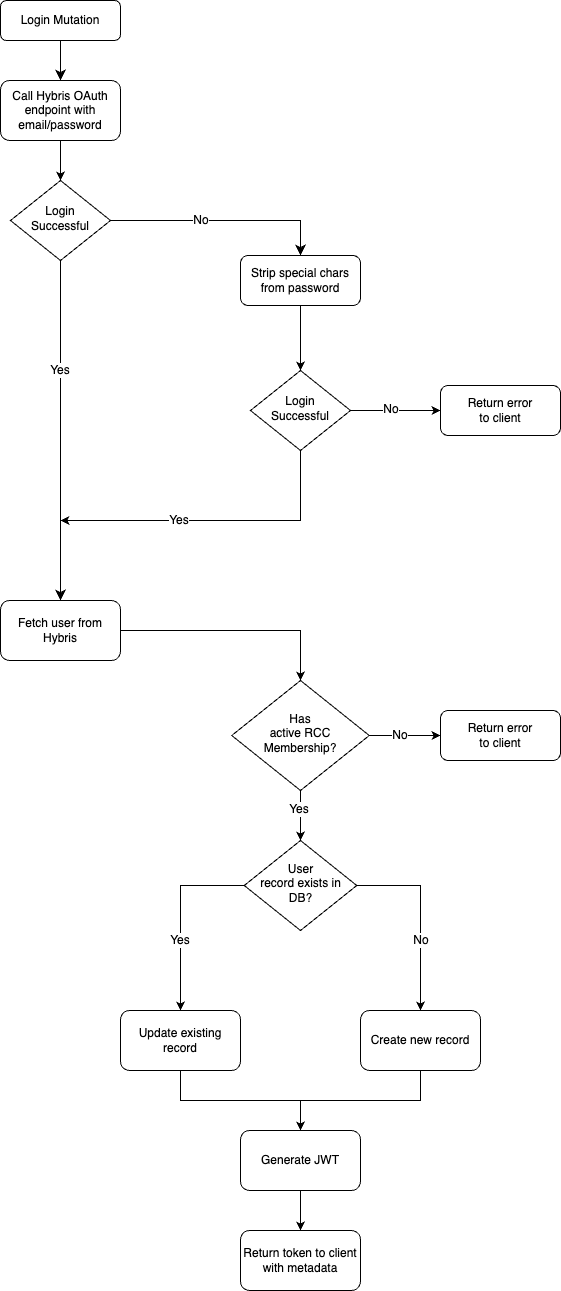
Mobile Login Flow
Below is our current view of the login flow for mobile. This does not identify any of the underlying architecture but we will go over them at each step.
Flow
- A customer logs in via one of our mobile clients.
- The mobile client sends an query to our mobile GraphQL server via a mutation. A mutation in GraphQL is an operation that allows you to insert new data or modify data on the server side. You can think of a GraphQL Mutation as the equivalent of POST, PUT, PATCH and DELETE requests in REST.
- The loginMutation first tries to login to Hybris. Detailed steps can be found below.
- It then extracts the access_token which is returned from login.
- Once it has the access_token it then performs a get to Hybris with the following fields
DEFAULT,rccMembershipNumber,rccMemberShipEndDate,rccMemberShipStartDate,rccChapter. This is doing using the hybris access token rather than the users. - The returned user objcet is then used to validate if the user has a valid RCC Membership based on todays date.
- The mutation then
- Checks if the user is existing RDS via Prisma
- If they don't then create them
- If they do update i migthem and create an Algolia user object. The user object is then added to the Algolia index. More about the Algolia indexes can be found below
- Checks if the user is existing RDS via Prisma
- The mutation then creates a JWT. The token is signed by the prismaUser ID that was created or updated in the previous step.
- A
user.loginevent is then send to therides-servicebus in Eventbridge. The detail includes the primsaUser object. This is used for analytics. - Finally the mutation returns the token and user object back to the client.
Login Function
- The login function is called by the loginMutation. It tries to login to Hybris by
- Stripping illegal characters
- Converting an auth object containing client id and secret as well as the customers email and password into a query string
- Sending a POST to the token endpoint with the accompanied querystring
- If this fails it then tries to login without stripping the illegal characters
- If both of these fail it surfaces an error to the client. These can either be:
- Invalid email or password
- Hybris is unreachable
Algolia Index
There are currently three Algolia indexes in the mobile backend. These are Users, User Groups and Event Location.
- The Users index is used to search for users.
- The User Group index is used for searching which groups a user belongs to or to find new groups.
- The Event Location allows customers to search for events.